
Overview
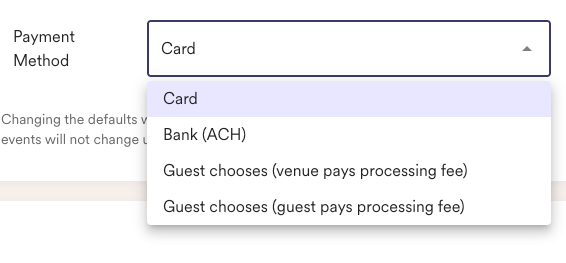
Venues on the Enterprise plan with ACH enabled can choose from the following payment configurations:
-
Card only
-
ACH / bank account only
-
Guest Chooses (Venue pays processing fee)
-
Guest Chooses (Guest pays processing fee)
How It Works
Set a Default Payment Method
You can configure a default payment method for all proposals in your Proposal Settings. This ensures a consistent experience for guests across events.
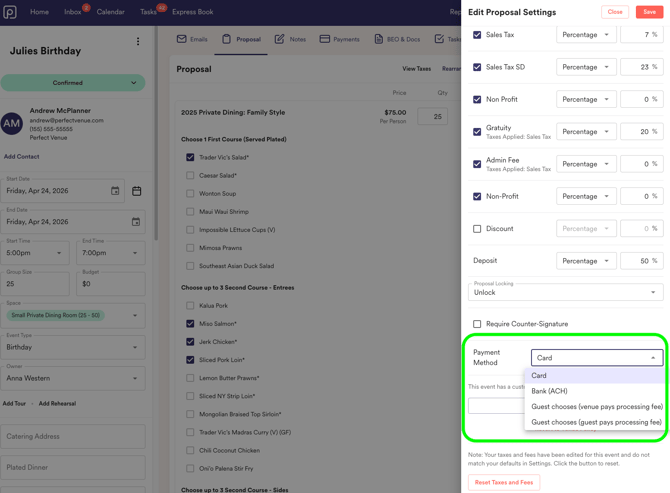
Override Per Event
If needed, you can override the default setting on a per-event basis. This allows flexibility for specific clients or bookings.
Credit Card Surcharge Behavior
When using the “Credit card or ACH, with a 2.9% surcharge” option:
-
The surcharge is only applied to credit card payments
-
ACH / bank account payments remain fee-free
Important Notes
-
The surcharge is not included in the contract total
-
The surcharge does not reduce the remaining balance on the event
-
The surcharge is only applied at the time of payment, not reflected in proposal pricing or documents
FAQs
Does the surcharge apply to all payments?
No. The surcharge only applies when a guest chooses to pay with a credit card and only when the surcharge option is enabled. Card network rules (from Visa and Mastercard) and state laws prohibit businesses from adding surcharges to debit or prepaid cards. Surcharging is strictly limited to credit card transactions.
Will guests see the surcharge in the proposal or contract?
No. The surcharge is only displayed in the proposal portal during payment.
Can I change the payment method for a single event?
Yes. You can override the default setting at the event level.
Does the surcharge affect reporting or balances?
No. It is not included in the contract total and does not impact the remaining balance.
Can I use this feature with Square and Stripe?
Yes, as long as ACH is enabled.
Can I change the credit card processing percentage?
No, guests will be charged the standard 2.9%.
Interested in trialing out this feature? You can easily start a free 7-day in Settings > Billing! Please also feel free to reach out support@perfectvenue.com with any questions.