
Table of Contents
- What is First Reply
- How it Works
- Turning First Reply on
- Customizing your First Reply
- What to expect after enabling
- Important limitations
- Questions
What is First Reply?
When a guest submits a contact form inquiry through your venue's listing, every minute you take to respond is a minute they might book somewhere else. Research consistently shows that the first vendor to respond wins the booking at a disproportionate rate.
First Reply solves this. It automatically sends a personalized email to guests about 5 minutes after they submit a contact form, even if you're in a tasting, at an event, or off for the weekend. Your venue shows up fast, every time, without you having to be at your desk.
First Reply is a feature of the Event Assistant. Learn more about Event Assistant: https://help.perfectvenue.com/knowledge/event-assistant-with-ai-reply
How it Works
When a guest fills out your contact form, Perfect Venue queues up a First Reply on your behalf. About 5 minutes later, they receive a personalized email response written to sound like it came directly from your team.
You control what goes in that email. You can tell First Reply what information to highlight (pricing, availability, capacity, signature packages), what tone to use, and what to leave out. The more context you give it, the more useful the reply will be for the guest.
First Reply is built on top of Event Assistant, Perfect Venue's AI layer for venue communication. It uses the configuration you set in Event Assistant to personalize each response to the guest's specific inquiry details.
Learn more about Event Assistant: https://help.perfectvenue.com/knowledge/event-assistant-with-ai-reply
Turning First Reply on
- Go to Settings in your Perfect Venue account.
- Select Event Assistant from the menu.
- Click into the First Reply section.
- Check the box to enable First Reply.
That's it. Once enabled, First Reply will begin sending automated responses to new contact form inquiries automatically.
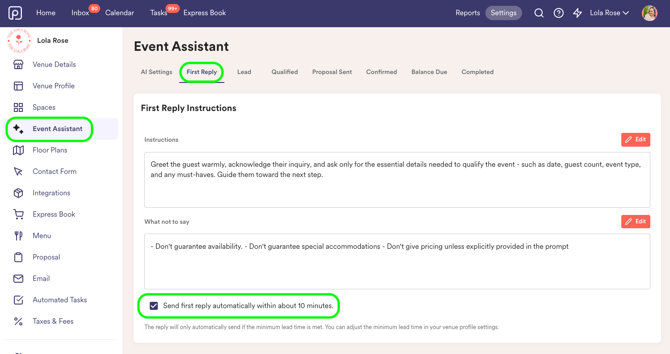
Customizing your First Reply
First Reply is fully configurable. To adjust what the automated email includes, go to Settings → Event Assistant → First Reply and update your instructions.
A few things worth configuring before you go live:
-
Instructions: Tell First Reply what you want every guest to know up front: your event minimums, your most popular packages, parking and logistics info, or whatever your team typically covers in a first touchpoint.
-
What not to say: If there's information you'd rather discuss on a call (like specific pricing or availability), you can instruct First Reply to hold that back and invite the guest to connect directly.
-
Your tone. First Reply takes cues from the instructions you write. If your brand is warm and casual, write your instructions that way. If you're more formal, reflect that. The more your instructions sound like you, the more the reply will too. You can also edit the overall tone of your AI Reply under Event Assistant > AI Settings > General AI Reply Instructions.
We recommend reviewing your First Reply configuration periodically, especially if your packages, pricing, or policies change.
What to expect after enabling
Once First Reply is on, new contact form inquiries will trigger an automated response within about 5 minutes. The inquiry will still appear in your Perfect Venue inbox as normal. First Reply doesn't replace your workflow, it just makes sure the guest hears from you quickly.
You can continue the conversation from your inbox just as you normally would. First Reply handles the first touchpoint; everything after that is you.
Important limitations
First Reply only triggers for contact form inquiries. If a lead is added manually through the dashboard, imported via CSV, or created through any other method, they will not receive an automated First Reply email. The feature is specifically designed for inbound guest inquiries submitted through your contact form.
Questions?
Reach out to support@perfectvenue.com and we'll help you get set up.