
Overview
Perfect Venue integrates with PartySlate so that every inquiry you receive on PartySlate flows directly into your Perfect Venue inbox. When a planner submits an inquiry through your PartySlate profile, it automatically appears in Perfect Venue as a new event with a lead status, including the planner's contact details and their original message.
No manual entry required on your end.
Table of Contents
- Requirements
- How to Set It Up
- What Happens When a Lead Comes In
- Frequently Asked Questions (FAQ)
- Need Help?
Requirements
Before setting up the integration, make sure you have:
- An active paid PartySlate subscription
- An active Perfect Venue account
How to Set It Up
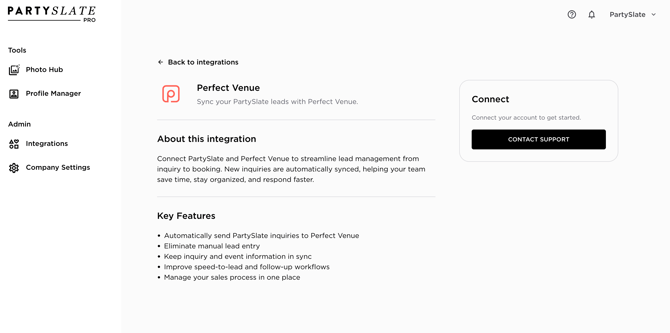
The integration is configured through PartySlate, not Perfect Venue.
Step 1: Fill out PartySlate's integration request form or go to Integrations on your PartySlate Account: Set up the integration →
Step 2: PartySlate will connect your account to Perfect Venue on their end.
Step 3: Once connected, new PartySlate inquiries will begin flowing into your Perfect Venue inbox automatically.
Note: If you have questions about the setup process or your PartySlate subscription, contact PartySlate directly through the form above.
What Happens When a Lead Comes In
Once the integration is active, here's what you'll see in Perfect Venue:
- A new event appears in your inbox with a lead status
- The planner's name, email, and contact details are attached
- The event's date, guest count, and original inquiry message is included in the event
From there, your normal Perfect Venue workflow applies! Send emails, create a proposal, attach a BEO, collect a signature, and move the event through your pipeline.
Frequently Asked Questions
Do I need to do anything in Perfect Venue to activate the integration?
No. Once PartySlate connects your account, leads appear in Perfect Venue automatically. There is no additional configuration required on the Perfect Venue side.
Where exactly do PartySlate leads appear in Perfect Venue?
They appear in your Perfect Venue inbox as new events with a lead status, the same as any other inbound inquiry.
What if I stop receiving PartySlate leads in Perfect Venue?
First confirm the integration is still active by reaching out to PartySlate. If your PartySlate account is active and the integration is connected, contact Perfect Venue support.
Does this work for all PartySlate inquiries?
Yes, any inquiry submitted through your PartySlate profile will flow into Perfect Venue once the integration is set up.
Need Help?
- Integration setup or PartySlate account questions: support@partyslate.com